Software Version - Document Version: v1.8.0-1.4
Used formatting:
|
Tip
|
Additional hint |
|
Note
|
Remark, further information |
|
Important
|
Crucial note, please obey |
|
Caution
|
Neglecting may cause malfunction |
|
Warning
|
Neglecting may cause severe malfunction or data loss |
1. Using Pixspan Image Compression
TIXstream supports Pixspan™ lossless compression of raw image formats: DPX, OpenEXR, Cineon, TIFF and ARRI RAW. Transfers of these formats can be accelerated by a factor of 2-5 depending on the content and the hardware.
|
Warning
|
This feature should only be used in combination with high performance hardware. Using this feature with inappropriate hardware could slow down transfers. |
|
Note
|
This feature requires a separate software plugin and license issued by Pixspan, Inc. Please contact sales@tixeltec.com for further information. |
2. Installing Pixspan Plugin
Unpack the TIXstream Pixspan plugin package
(root) $ tar xzf tixstream-pixspan-plugin* && cd tixstream-pixspan-plugin*
Run the install script
(root) $ ./install_pixspan_plugin.sh
This copies the libraries to ${TIXEL_HOME}/plugins/pixspan.
2.1. Licensing
The Pixspan processing nodes are only available for certain TIXstream licenses and an additional license from Pixspan.
The default licensing is done via node locked license file which has
to be copied to ${TIXEL_HOME}/plugins/pixspan.
Alternative license options (e.g. obtaining the license from a license server) are available on request from Pixspan.
3. Verifying Installation
After installation of the Pixspan plugin and the Pixspan library
the installation can be verified with the pixspan-check tool by
(root) $ cd /opt/tixel/plugins/pixspan && ./pixspan-check
Pixspan ready!
The tool checks if the library is loadable and if a Pixspan license is available.
4. Configuring TIXstream for Pixspan
The Pixspan plugin is configured in the TIXstream service configuration file
tixstream.conf. To activate Pixspan compression the following options must be
properly set:
-
pixspan-lib-path- Absolute path to the Pixspan library
In case of using a license server set these additional options:
-
pixspan-lic-host- Hostname or IP of a valid Pixspan license server -
pixspan-lic-port- Port to connect to the Pixspan license server
Setting the environment variables PIXSPAN_LIC_HOST and PIXSPAN_LIC_PORT
Still works but is not recommended
Further optional Pixspan specific options:
-
pixspan-tiles- Tiles to use for compression (0 or >12 means auto-tiling) -
pixspan-threads- Number of threads used to process a frame -
pixspan-threadpool-size- Number of threads to allocate for the thread pool -
pixspan-gpu-flags-
0x1 use GPU
-
0x2 allow primary display
-
0x4 debug on
-
0x8 GPU number is in bits 8-15
-
0x10 store MD5 checksum
-
0x20 store MD5-mt checksum
-
If the library is initialized TIXstream prints its configuration on level INFO:
Pixspan library: /opt/tixstream/plugins/libpixspanmem.so
...
Pixspan: License server makemake.tixeltec.de:5055
        thread count 2 pool size 10 tile count 0 GPU flags 3
Example configuration section in tixstream.conf:
# Options for the Pixspan image compression library
pixspan-lib-path = /opt/tixel/plugins/pixspan/libpixspanmem.so
pixspan-lic-host = example.tixeltec.de
pixspan-lic-port = 5055
pixspan-tiles = 0
pixspan-threads = 1
pixspan-threadpool-size = 32
pixspan-gpu-flags = 0
The TIXstream profiles FileTransferSender.config and
FileTransferReceiver.config located in ${TIXEL_HOME}/config/profiles have a
Pixspan section where the number of TIXstream threads feeding the Pixspan
thread pool can be configured:
[Sender/Stream/PixspanCompress]
Type              = Pixspan
NumThreads        = 32
[Receiver/Stream/PixspanDecompress]
Type = Pixspan
NumThreads = 32The default configuration is suitable for CPU based processing and data rates around 5GBit/s. See Performance for more information.
Enable the Pixspan acceleration as follows:
-
Log in as an admin user into TIXEL Control Center
-
Switch to the node configuration
-
Set the Pixspan Acceleration policy to
preferredfor all nodes -
Set the chunk size to a value at least as big as the frame size
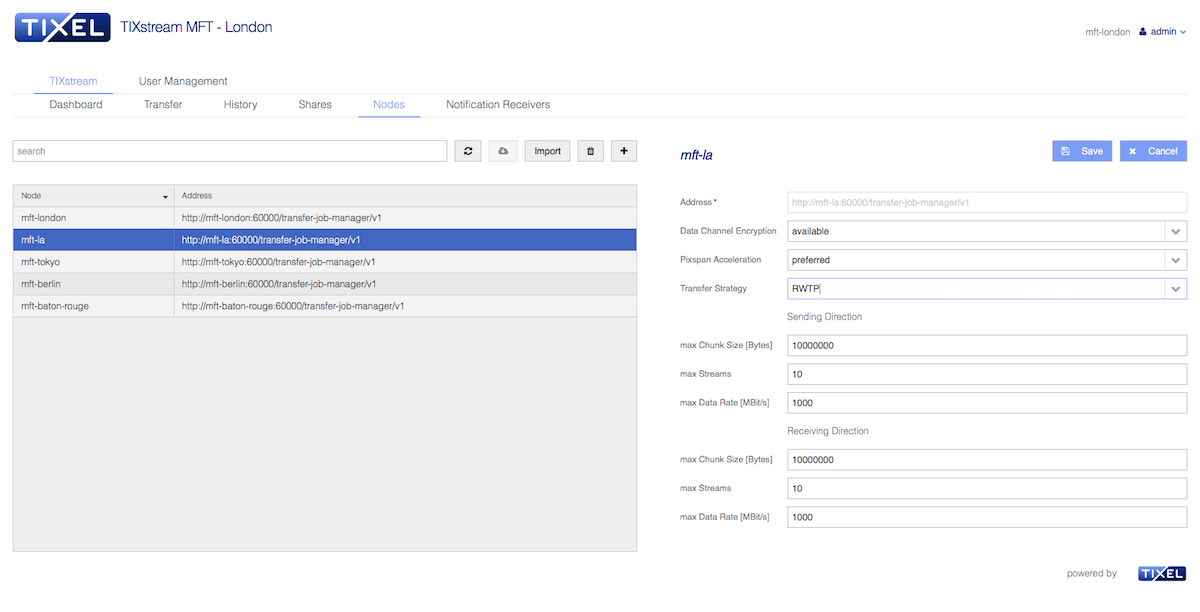
The example sets the chunk size to 10 MByte, which allows to compress for example 1920x1080 10Bit DPX frames.
4.1. Using Pixspan
From the user perspective a Pixspan accelerated transfer is set up in the same way as a none Pixspan transfer. When the Pixspan acceleration is available on both ends, it is automatically applied to all transfers. If the transfer includes files which are not compressible, the data is forwarded 1:1 without any performance penalty.
4.2. Using GPUs
Besides CPU based processing the Pixspan compression library can use GPUs. Therefore the following requirements have to be fulfilled:
-
Compatible GPU (Nvidia with CUDA support)
-
NVIDIA Quadro M5000, M6000, P6000, GP100
-
GeForce GTX Titan X (Maxwell), Titan X Pascal, 1080 Ti
-
-
GPU enabled Pixspan library installed
The GPU enabled library version has the suffix _gpu. Set the service configuration
Parameter pixspan-lib-path and pixspan-gpu-flags accordingly.
as shown in Installing Pixspan Plugin.
TIXstream enables GPU processing (including utilization of primary GPU) by default and falls back to CPU-only processing if one of the requirements is not met.
For more information on when utilization of GPUs is beneficial see GPU vs. CPU
4.3. Multithreading
There are two different multithreading strategies available:
-
Intra-frame
-
Inter-frame
With intra-frame strategy, a frame is split up into the three color
components and in up to 12 tiles which are processed in parallel.
This is configured by the service configuration parameters pixspan-tiles and pixspan-threads.
The number of Pixspan threads should be a multiple of three
(one thread per component) and each tile should be processed in a separate
thread. The rule of thumb is
pixspan-threads = pixspan-tiles x 3
If both values are set to one, no intra-frame threading is used.
The inter-frame strategy is configured by the NumThreads profile parameter and
defines how many Pixspan nodes are used in parallel. Each node processes an
entire frame.
|
Note
|
Inter-frame multithreading requires a correctly dimensioned buffer pool. See Buffer Pool Dimensioning for more information. |
The CpuIds which can optionally be defined are tied to the inter-frame threading
strategy.
Depending on hardware and use case either one of the both or a combination of both strategies is the best option. For further information see the chapter in the performance section Intra vs. Inter Multithreading
4.4. Performance
The Pixspan compression is the most CPU intensive task in the processing chain of TIXstream and usually the limiting performance factor.
The target data rate set in TIXstream is the network bandwidth consumed by TIXstream. That means that the compression or decompression data rate must be
COMPRESSION FACTOR x TARGET DATA RATE
to achieve the target data rate.
Example: To fill a 1 GBit/s (125 MByte/s) link with a compression factor of 3 requires a compression/decompression performance of 3 GBit/s (375 MByte/s). Depending on hardware, 16-24 threads running on dedicated CPUs are required to achieve this.
The data rate shown by TIXstream is the data rate of the file writer, not the data rate on the link.
4.4.1. GPU vs. CPU
GPU based processing is usually much more efficient than CPU only processing. In combination with certified hardware (e.g. Nvidia M6000 GPU, HP z840 workstation) up to 1500 MByte/s throughput can be achieved. The CPU only processing provides up to 700 MByte/s (on the same platform).
Using less performant GPUs or workstations (e.g. without PCI Express 3.0 support) might lead to lower performance than CPU only processing. Therefore it is highly recommended that only certified hardware is used.
4.4.2. Intra vs. Inter Multithreading
In the CPU only processing scenario the inter-frame multithreading provides the
best performance. The pixspan-threads and pixspan-tiles parameters should be
set to 1 and only NumThreads in combination with CpuIds should be defined.
The maximum number of threads depends on the hardware, the TIXstream
processing pipe and the network parameters (loss, latency, etc.). In general,
TIXstream should get at least one dedicated CPU for the network sender and
receiver. In high latency/loss scenarios (WAN) the CPU core which is used by
the network interface (NIC) to process incoming packets (usually CPU 0) should not be used by
TIXstream. The remaining cores can be used by Pixspan nodes, 1-2 threads
per core.
The GPU based processing requires intra-frame multithreading in order to
provide reasonable performance benefits. Usually four tiles with three threads
per tile provide a good performance (pixspan-tiles=4, pixspan-threads=12).
This can be combined with inter-frame multithreading in order to maximize the
throughput. With certified hardware up to three frames can be processed in
parallel (NumThreads=3).
|
Note
|
The CpuIds should not be configured in combination with intra-frame
multithreading strategy.
|
Depending on hardware and content, the parameters have to be adjusted to optimize performance. Therefore short test transfers while monitoring CPU, network and storage utilization can help to find the optimal parameters.
4.4.3. Buffer Pool Dimensioning
The performance highly depends on a correctly dimensioned buffer pool. Each thread of a processing node within the processing chain (defined in the TIXstream profile) needs at least one buffer in order to allow all threads to work in parallel. I.e. a processing chain consisting of e.g. 1 FileReader, 8 PixspanCompressors, 1 NetworkSender needs at least 10 buffers. It make sense to overprovision the number of buffers by 4-5 buffers in order to keep the internal queues always filled.
4.5. Common Pitfalls
The most common error scenarios in combination with Pixspan nodes are:
-
Missing or expired Pixspan license
-
Missing Pixspan library
-
Unresolved Pixspan library dependencies
All these issues result in a configuration error reported in the TIXstream log file.
4.6. Limitations
4.6.1. Buffer Size
The chunk size in the Control Center node configuration has to be set to a value greater than the biggest compressible file size of the transfer. All compressible files which are bigger than the buffersize are transfered uncompressed.
5. Updating TIXstream MFT
5.1. Updating from 1.6.1 to 1.7.0
The Pixspan image compression library is now initialized early upon start of TIXstream. This requires the movement of several options from the profiles into the service configuration.
To activate Pixspan compression the following options need to be properly set in tixstream.conf:
-
pixspan-lib-path- absolute path to the Pixspan library -
pixspan-lic-host- hostname or IP of a valid Pixspan license server -
pixspan-lic-port- port to connect to the Pixspan license server
|
Note
|
Setting the environment variables PIXSPAN_LIC_HOST and PIXSPAN_LIC_PORT still works but is not recommended.
|
Further optional Pixspan specific options:
-
pixspan-tiles- tiles to use for compression (0 or >12 means auto-tiling) -
pixspan-threads- number of threads used to process a frame -
pixspan-threadpool-size- number of threads to allocate for the thread pool -
pixspan-gpu-flags-
0x1 use GPU
-
0x2 allow primary display
-
0x4 debug on
-
0x8 GPU number is in bits 8-15
-
0x10 store MD5 checksum
-
0x20 store MD5-mt checksum
-
New Pixspan related example settings in tixstream.conf:
# Options for the Pixspan image compression library

pixspan-lib-path = /opt/tixel/plugins/libpixspanmem.so
pixspan-lic-host = example.tixeltec.de
pixspan-lic-port = 5055
pixspan-tiles = 0
pixspan-threads = 1
pixspan-threadpool-size = 32
pixspan-gpu-flags = 0
Therefor the following parameters are now obsolete in the profiles:
# Hashed options are obsolete
[Section/Stream/Pixspan]

 Type                   = Pixspan
#NumPixspanThreads      = 2             # moved to tixstream.conf
#NumTiles               = 4             # moved to tixstream.conf
 NumThreads             = 10